




Automated invoice approval software for efficiency

Table of contents

Automate invoice approval, processing, and routing to reduce manual work and errors in accounts payable (AP).
- Start from prebuilt invoice approval templates. Then configure and test them for your process.
- Process paper and PDF invoices automatically using optical character recognition (OCR) and AI data capture.
- Connect ERP and accounting systems through supported APIs or integration platforms; confirm the method for your system.
- Track approvals in real time with customizable workflows and automatic escalations.
What is invoice approval software?
Invoice approval software automates how businesses handle invoices from receipt to payment. It captures data, verifies invoices and routes them for approval, and processes payments. The software reduces manual work and errors in AP, which helps maintain vendor relationships and gives finance teams better control over spending. The category is also called electronic invoice approval software or an invoice approval system — the same tooling, named for replacing paper- and email-based signoff with digital routing.
Try Nutrient Workflow for free
Is your current invoice process manual?
Invoice approvals at many companies require a slow, manual process subject to human error. Whether the approval process is via paper or email, it results in long approval cycle times that slow down the business and require escalating overhead to manage.
Managers can’t see where bottlenecks occur and lack tools to audit the process for compliance. Finance managers work without visibility as invoices pile up. The business pays late fees, loses invoices, and struggles with cash flow.
Automating with invoice approval workflow software
Every company has different invoice approval requirements, but all benefit from automation. Our invoice approval workflow software lets you build an automated approval process that matches your standards and procurement process. Set up your business rules, approval hierarchies, escalations, and exception handling.
Managers submit invoices through a dashboard button, fill in the information, attach files, and submit. Approvers receive alerts for new requests and can review them via email or the portal. They can approve, reject, or request more information.
Set limits for invoice amounts that trigger escalation to higher approval levels. Requesters can track their invoice status throughout the approval process.
Invoice approval automation benefits
Automating AP and invoice processing delivers:
- Shorter cycle times
- Standardized, compliant invoice handling
- Full visibility into approval status and history
- Better collaboration between AP teams and departments
- Improved exception handling
- More early payment discounts captured
- Integration with ERP, accounting, and enterprise systems
Prebuilt invoice approval templates and example workflow
Nutrient Workflow customers can use prebuilt templates for invoice approval — simply download, configure, and launch. These templates provide a ready-made foundation for building your process, helping you get up and running quickly.
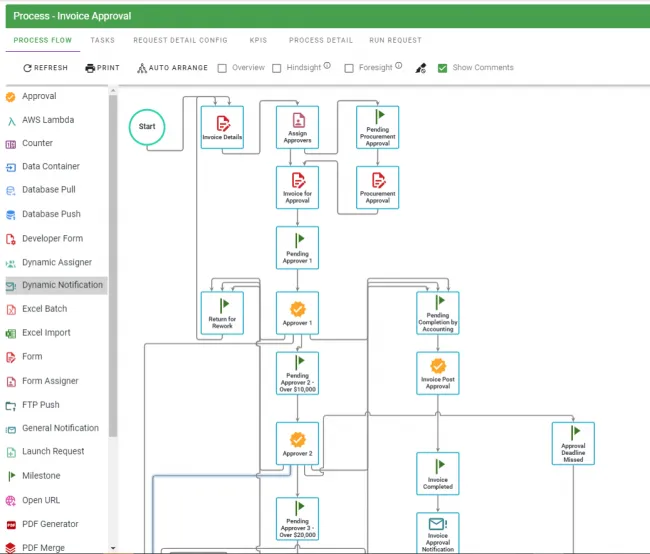
The example workflow above illustrates multiple checkpoints and approval levels designed to ensure proper standards are met before an invoice is approved.
You can also download our free vendor invoice approval and payment process template for a more detailed, end-to-end example.
Advanced features: OCR, AI, and intelligent data capture
Nutrient Workflow’s AI data extraction task can populate workflow fields from uploaded invoices. Configure the provider, model, extraction prompt, and response mappings, and then test representative documents. Review uncertain or incorrect results before they drive payment or approval decisions. Paper invoices must first be scanned.
For scanning hard copy invoices or implementing robotic process automation (RPA), we work with certified partners. These services reduce manual handling and improve data accuracy.
The following are examples of AI capabilities we now offer in Nutrient Workflow.
Conclusion
Manual invoice approval processes create bottlenecks, errors, and compliance risks that slow your business down. Nutrient Workflow helps address these problems with automated workflows that match your approval hierarchies and business rules — from OCR data capture to ERP integration.
Prebuilt templates provide a starting point; production rollout also requires configuration, integration work, and testing. Ready to streamline your invoice approval process? Contact our Sales team to see how Nutrient Workflow can transform your accounts payable operations.
Explore finance workflow solutions
FAQ
Invoice approval software automates the accounts payable signoff process: It captures invoice data (from paper, PDF, or e-invoices) and verifies it, routes each invoice to the right approvers based on rules like amount and department, and hands the approved invoice to payment. It’s also called electronic invoice approval software or an invoice approval system.
Nutrient Workflow Automation Platform offers prebuilt invoice approval templates, configurable AI extraction tasks, and customizable approval hierarchies. REST integration tasks can connect to accounting systems with suitable APIs; authentication, field mappings, permissions, and error handling require configuration. You can configure complex business rules and escalations through a visual interface without writing code.
Download the template, configure your approval hierarchy and extraction tasks, connect your systems, and test the complete workflow before launch. The timeline depends on integration complexity, security requirements, exception handling, and user acceptance testing.
Business users can design forms, approval rules, and escalations in the visual interface. Connections to accounting systems require technical configuration of credentials, permissions, mappings, and error handling, and may need IT or developer involvement.
Yes. Scan paper invoices first. Then configure an extraction task for the digital files. Select a provider and model, define the prompt and response mappings, and validate the extracted fields. AI extraction can reduce manual entry, but results still need exception handling and review.
Nutrient Workflow can connect to external systems through REST integration tasks and integration platforms. For SAP, Oracle, Microsoft Dynamics, QuickBooks, NetSuite, or Salesforce, confirm the available API or connector, its licensing, and the actions you need. These connections may require middleware or custom configuration; a native connector isn’t implied for every product.
You can set automatic escalation rules based on time limits, approval amounts, or specific conditions. If an invoice isn’t approved within a defined timeframe, the system automatically routes it to the next approval level or designated backup approver. All escalations are logged for compliance and audit purposes.
Yes. Nutrient Workflow is fully customizable to match your approval hierarchies, spending limits, departmental routing, and exception handling rules. You can create multilevel approvals, parallel approval paths, conditional routing based on invoice amounts or vendors, and custom notification rules.
Nutrient Workflow provides real-time dashboards showing invoice status, approval bottlenecks, and processing metrics. All actions are logged with timestamps and user details for complete audit trails. You can generate reports on cycle times, approval rates, exceptions, and compliance metrics. Custom reports can be created to meet specific audit requirements.


